FOR MACHINE BUILDERS · INSTALLED BASE

Know how the machines you delivered are running, before your customer calls

Mapper connects the machines you have already installed at customer sites and shows your service team how each one is behaving. You see the fault coming, plan the visit and send a technician who already knows what is wrong. No software team to hire.

FREE · IN WRITING · ABOUT YOUR OWN MACHINES

THE SERVICE PROBLEM

Today, the customer calls first

Your machines are running in other people's plants and telling you nothing. You find out something is wrong when the phone rings, and by then the line has usually stopped. The question worth asking your own service team is simple: do you know before the call comes?

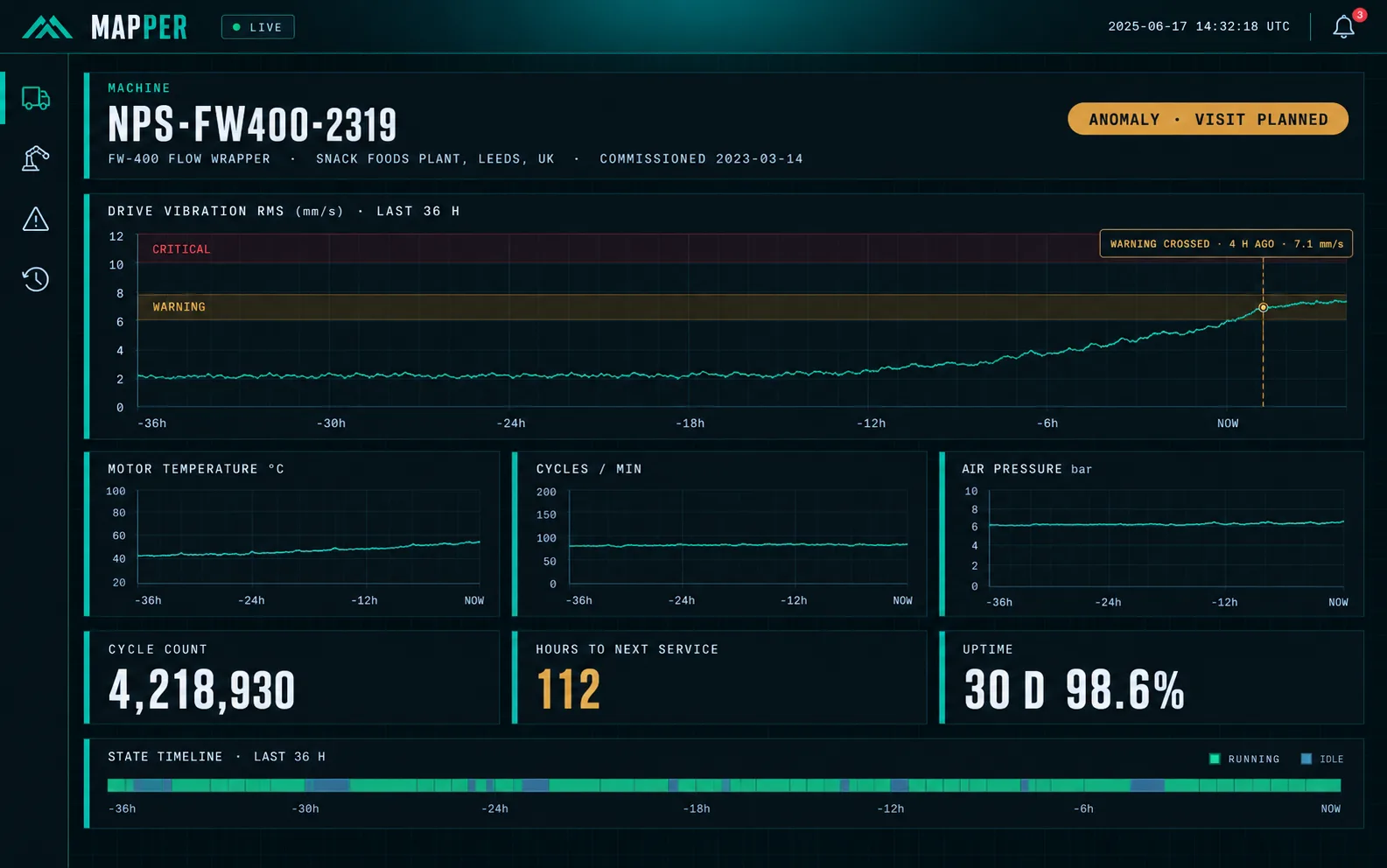
Illustration of a Mapper machine health view: a flow wrapper at a customer plant whose drive vibration has been rising for hours and crossed the warning band 4 hours ago, with a visit already planned
Illustrative interface
  1. TODAY

    The customer calls

    WITH MAPPER

    You already knew

    The machine reports how it is running. When its behaviour changes, your service team sees it and plans the visit instead of finding out once the line has stopped.

  2. TODAY

    Diagnosis needs a trip

    WITH MAPPER

    The technician knows before leaving

    Alarms, readings and the last hours of operation are visible remotely. Some faults get solved over the phone; the rest get a technician with the right part in the van.

  3. TODAY

    The history is in one person's head

    WITH MAPPER

    Anyone can look it up

    Every intervention is recorded against the machine's serial number. When the engineer who commissioned it moves on, what they knew stays with the company.

WHAT MAPPER DOES

Built for the machines you have already delivered

Mapper is remote monitoring software for industrial equipment manufacturers. It reads the data your machines' controls already produce and turns it into something your service team can act on. It is set up around your machines and your service process, not sold as an off-the-shelf platform.

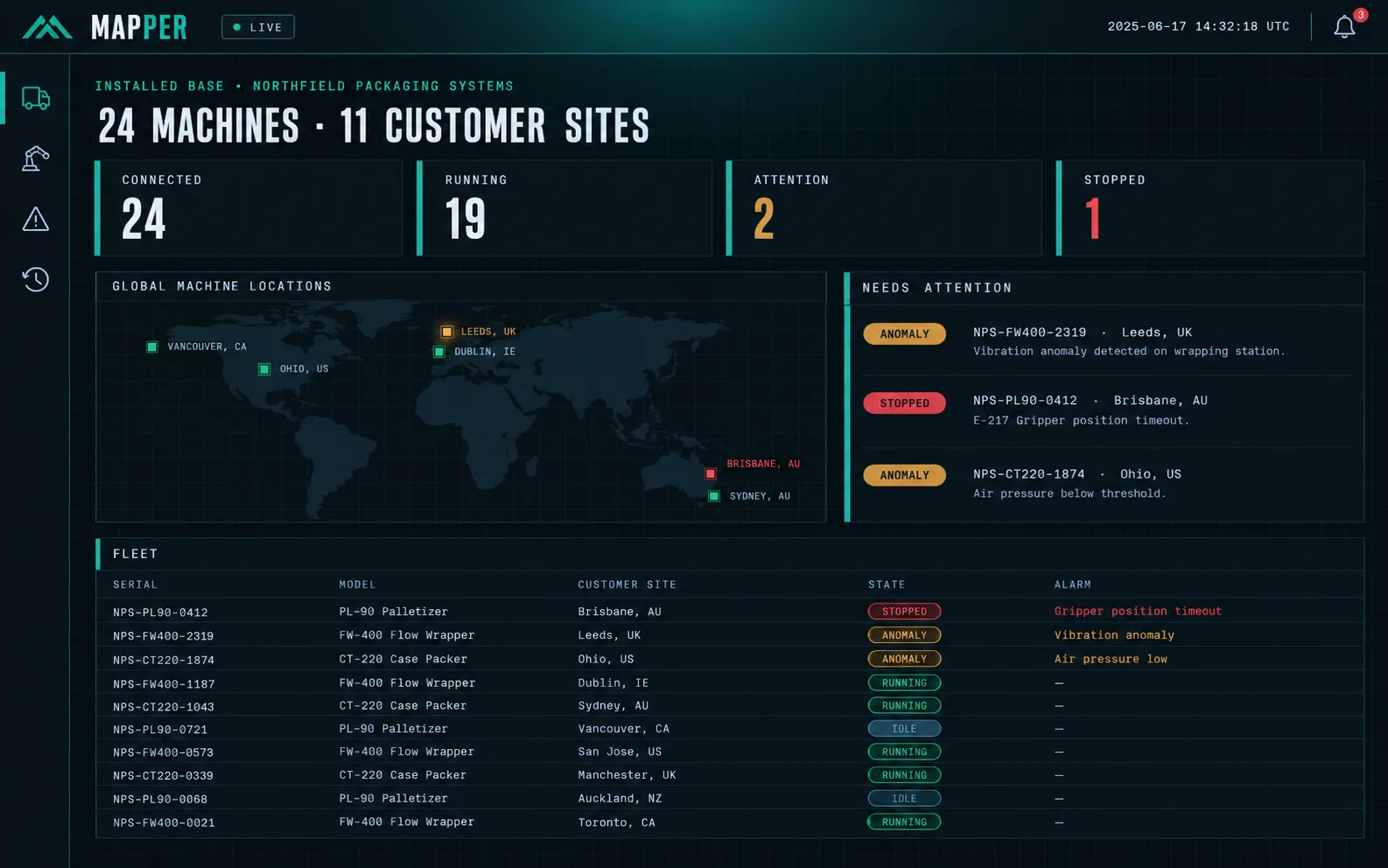
Illustration of the Mapper installed-base overview: 24 machines at 11 customer sites on a world map, with counters for connected, running, attention and stopped machines, and a fleet table sorted by severity
Illustrative interface

Telemetry from the controls you already fit

Temperatures, pressures, vibration, cycle counts, alarms and states, read from the PLC over OPC UA, Modbus or MQTT.

One view of the whole installed base

Every machine at every customer site, with its status and model, and the machines that need attention at the top.

Alerts when behaviour changes

Thresholds for the obvious cases and anomaly detection for the slow drift nobody sets a threshold for.

Remote diagnosis

Look at the last hours of a machine before deciding whether anyone needs to travel, and what they need to take.

Service history per serial number

Interventions, settings, replaced parts and notes, searchable by machine, by customer or by fault.

A customer portal with your brand

Your customer sees their own machines' production and health data under your name, not ours.

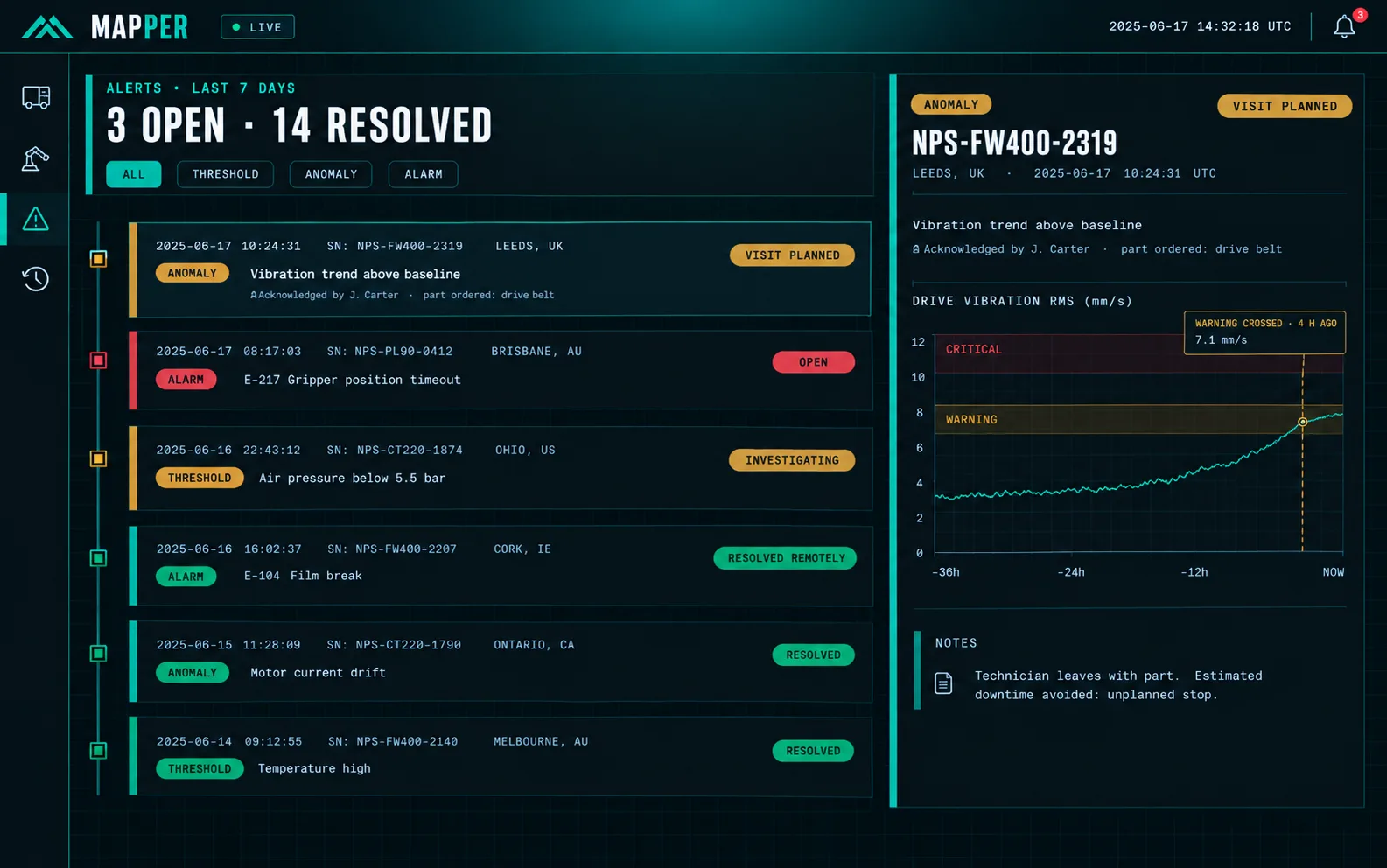
Illustration of the Mapper alerts view: open and resolved alerts across the installed base, with a vibration anomaly marked as visit planned and a film-break alarm resolved remotely
Every alert across the installed base, with who picked it up and what happens next.
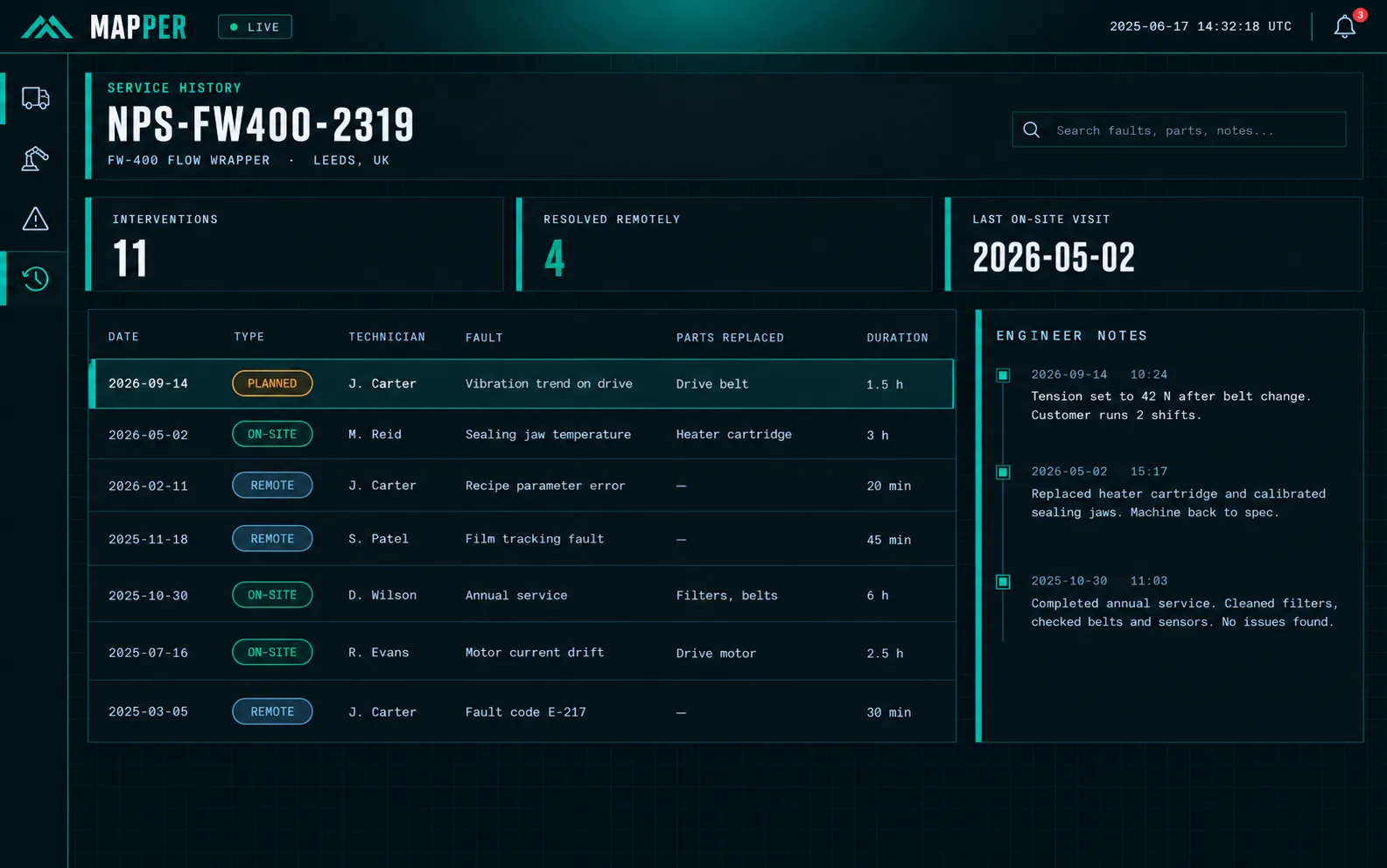
Illustration of the Mapper service history for one serial number: interventions, remote or on-site, technician, fault, parts replaced and engineer notes
The service history of each machine, searchable by serial number, fault or part.

Illustrative interface

HOW THE DATA GETS OUT OF A MACHINE AT A CUSTOMER SITE

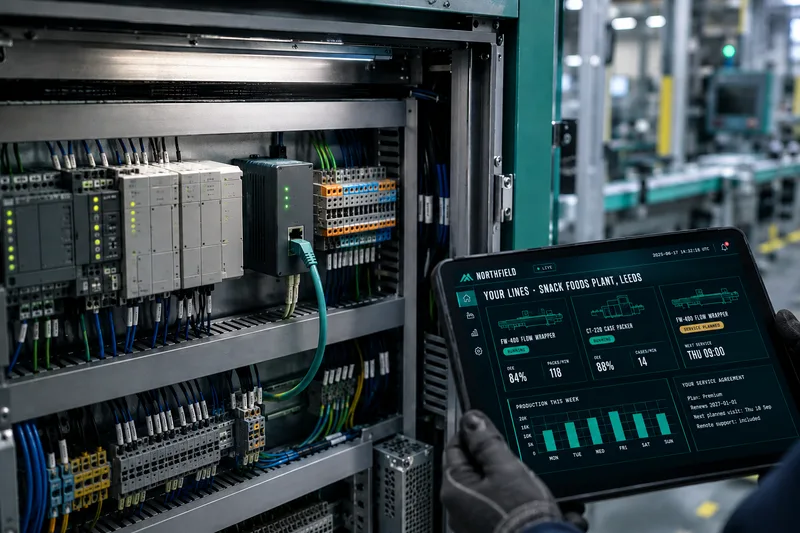
An edge gateway mounted on the DIN rail of a machine's control cabinet, next to the PLC, while a technician holds a tablet showing the customer portal
  1. 01

    Your machine's controls

    The PLC and sensors already in the machine. If it exports nothing, sensors are added.

  2. 02

    Edge gateway

    A small device in the cabinet that reads the controls and sends data out. Nothing connects in.

  3. 03

    Mapper

    Stores the history, checks behaviour and raises alerts. Cloud, private cloud or on-premise.

  4. 04

    Your service team and your customer

    Dashboards, alerts and service history for you; a branded portal for them.

How each machine connects depends on its controls, the customer's network and their IT policy. Working that out is the first thing the free analysis does.

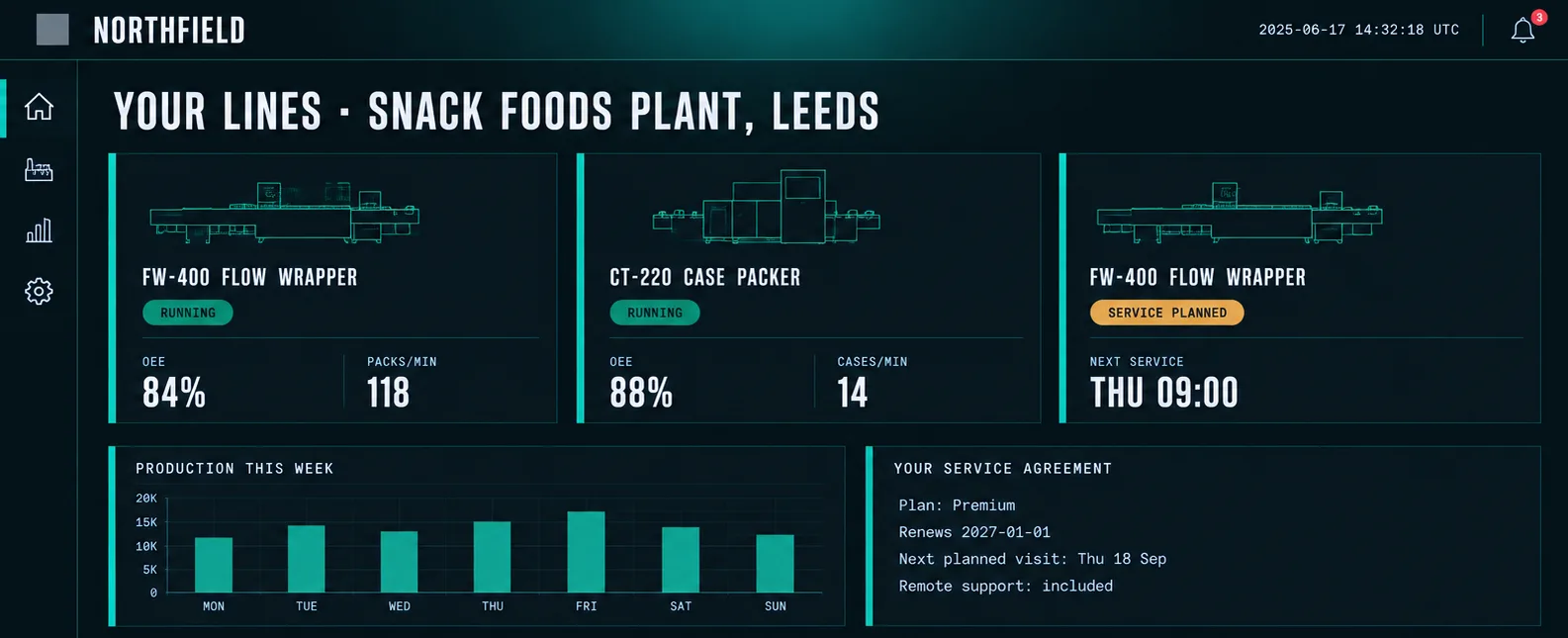
Illustration of a customer portal carrying the machine builder's own brand: line status, OEE, production this week and the customer's service agreement
What your customer sees: their machines, their production and their service agreement, under your brand. Illustrative interface

FOR THE OWNER

The machine keeps earning after it ships

The large OEMs already sell connected machines with a service subscription attached. Lower-cost builders sell the same mechanical performance for less. You will not win by becoming Siemens, and you will not win by getting cheaper.

What you can do is make your machine worth more after delivery. Once you can see how it runs, service stops being a call-out you invoice once and becomes an agreement your customer renews.

  1. 1

    See the condition of every machine you sold

    The installed base stops being a black box between visits.

  2. 2

    Plan service instead of reacting to it

    Visits, parts and technicians scheduled from what the machine reports.

  3. 3

    Sell it as an agreement

    Monitoring, planned maintenance and the portal, billed every year instead of once.

Why this matters for machine builders →

HOW IT STARTS

The first two steps are free and written around your machines

You can stop after either of them. What is free is the analysis and the plan we produce, not a sales call.

  1. 01 Free

    Analysis of your case

    We look at how a fault reaches you today, from the customer's call to the engineer on site, and send back a report on which visits could have been seen coming and which could have been handled without travelling.

  2. 02 Free

    Connection strategy

    Which machines to start with, what their controls already expose, what early warning is realistic and in what order to do it. Written around your installed base.

  3. 03 Price and scope in writing

    Pilot on one machine

    One machine, at one customer, connected end to end. Scope, price and dates agreed in writing first. The time it takes depends on the controls, the network and the site.

  4. 04 Your pace

    Roll out across the installed base

    More machines, more customers, the branded portal and the service agreement you sell on top of it.

Pricing guide

Pilot on one machine

One machine whose controls already expose data: gateway set-up, dashboard, alerts and service history.

From €2,900

Installed-base monitoring

Every connected machine in one view, with anomaly detection and integration with your ERP or CRM.

Quoted per fleet

Customer portal and service programme

A portal under your brand and the data behind a service agreement you sell to your customers.

Custom

Prices exclude VAT. Every project is quoted in writing after the connection strategy, so you know the cost before you commit to anything.

  • 25+

    Digitalization projects delivered for industrial and equipment-manufacturing companies since 2020

  • Remote by design

    An engineering and software team built to work with machine builders in English, wherever their machines are installed. The people connecting your machine understand machines.

  • Sensor to screen

    Machines that export nothing get sensors, electronics and firmware from the same team

    See mechatronics →

Not a service problem?

If your bottleneck is the engineering office, start somewhere else

When the hours go into rebuilding quotes, configurations and documentation for every order, that is a software problem, not a monitoring one.

See software for engineering

FREQUENTLY ASKED QUESTIONS

What machine builders ask us

What is installed-base monitoring for a machine builder?

It means reading data from the machines you have already sold, while they run at your customers' sites, so your service team can see their condition without being there. Mapper collects that data from each machine's controls, raises alerts when behaviour changes and keeps the service history per serial number, so service can be planned instead of reactive.

Our machines sit behind the customer's firewall. How does the data get out?

Through an edge gateway installed in the machine that only makes outbound connections, so nothing on the internet can reach into the customer's network. It needs the customer's IT to approve it, and where their network cannot be used, a separate connection is an option. Which route fits each customer is part of the free connection strategy.

Which controllers work? Do we have to redesign the machine?

Usually not. Mapper reads controls that speak OPC UA, Modbus or MQTT, which covers most modern PLCs. Older machines that expose nothing can have sensors and electronics added by our mechatronics team without redesigning the machine.

Do we need a software team to run it?

No. The point is to add this capability without hiring a software organization. We build and set it up around your machines, train your service team to use it and keep it running under a support agreement.

Who owns the data, us or our customer?

That is agreed between you and your customer, and Mapper supports either arrangement. The data can live in our managed cloud, a private cloud or on-premise, depending on what you and your customers' IT policies require.

Can we sell monitoring to our customers under our own brand?

Yes. The customer portal carries your brand, and the data it shows is what makes a yearly service agreement possible: planned maintenance, remote support and production data your customer reads every morning.

How long does it take to connect our first machine?

It depends on the machine's controls, the customer's network and access to the site, so we do not promise a number of weeks before seeing them. The free connection strategy gives you the order to do it in and a realistic estimate, and the pilot is agreed in writing with dates before it starts.

Can machines already in the field that export nothing be connected?

Yes. When the data you need only exists on a gauge or inside a controller with no communication, our mechatronics team adds the sensors, electronics and firmware, and the same team connects them to Mapper.

Selling the next machine

Let the customer stand next to it before it is built

OmniViewer places any machine in your range at 1:1 scale in VR, on your trade-show stand or inside your customer's own plant, so the footprint and access are settled before the order.

See OmniViewer
Next step

Do you know before the call comes?

Tell us what machines you build and how a fault reaches your service team today. You will leave knowing which machines to connect first, what their controls already allow and what it would take.

See success stories