From CAD File to Virtual Showroom: How to Turn Your Product Catalogue into a Digital Twin
Turn your CAD catalogue into a virtual showroom: technical pipeline, the Five Gates evaluation framework, real cost ranges, and mistakes to avoid.

Written by Eduardo Fuentevilla Blanco
Robotics Engineer at Maedcore · Robotics Engineer LinkedIn ↗
Key Takeaways
- ► A CAD-derived VR showroom is a product digital twin prototype — not an operational twin — unless a real-time IoT data layer is added; conflating the two is the most common credibility failure with technical buyers.
- ► Automated removal of internal geometry can reduce a CAD assembly file size by up to 90% (example: 500 MB → 50 MB in automotive) without degrading visual perception — the single highest-impact optimisation in the pipeline.
- ► Platform polygon budgets are: < 500,000 triangles/scene for standalone (Quest 3), < 2,000,000 for PC-VR, and < 200,000 for WebGL — thresholds that determine the level of decimation and LOD generation required before delivery.
- ► A single physical trade show appearance costs $25,000–$45,000; a VR showroom built once deploys at every show, every sales visit, and every remote demo.
- ► The global digital twin market is valued at between $21.14 billion (MarketsandMarkets) and $35.8 billion (Grand View Research) for 2025 — a divergence reflecting differences in scope definition, not a consensus on actual market size.
- ► Madrid's ERDF-backed Industry 4.0 grants can offset 20–25% of eligible software and hardware costs for industrial SMEs in the Madrid corridor; the Kit Digital programme does not cover custom development.
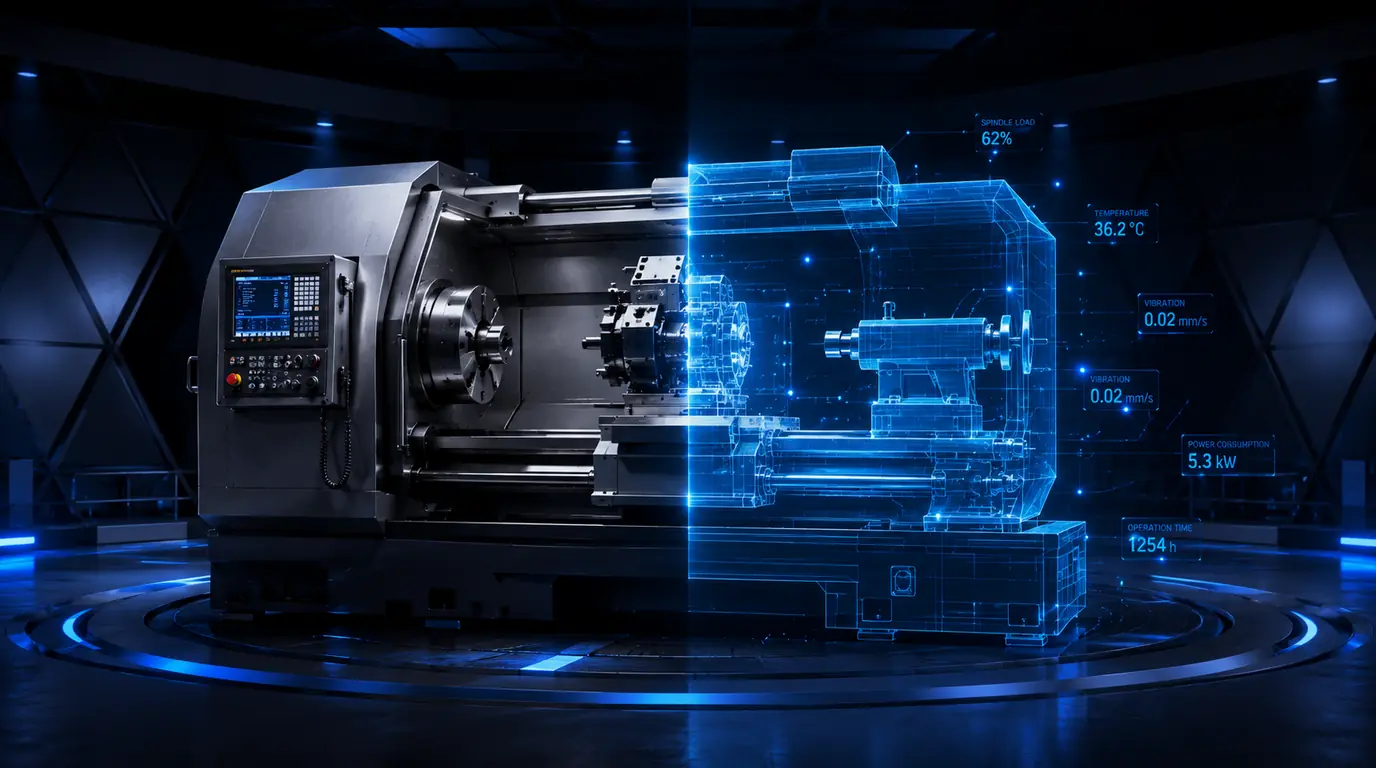
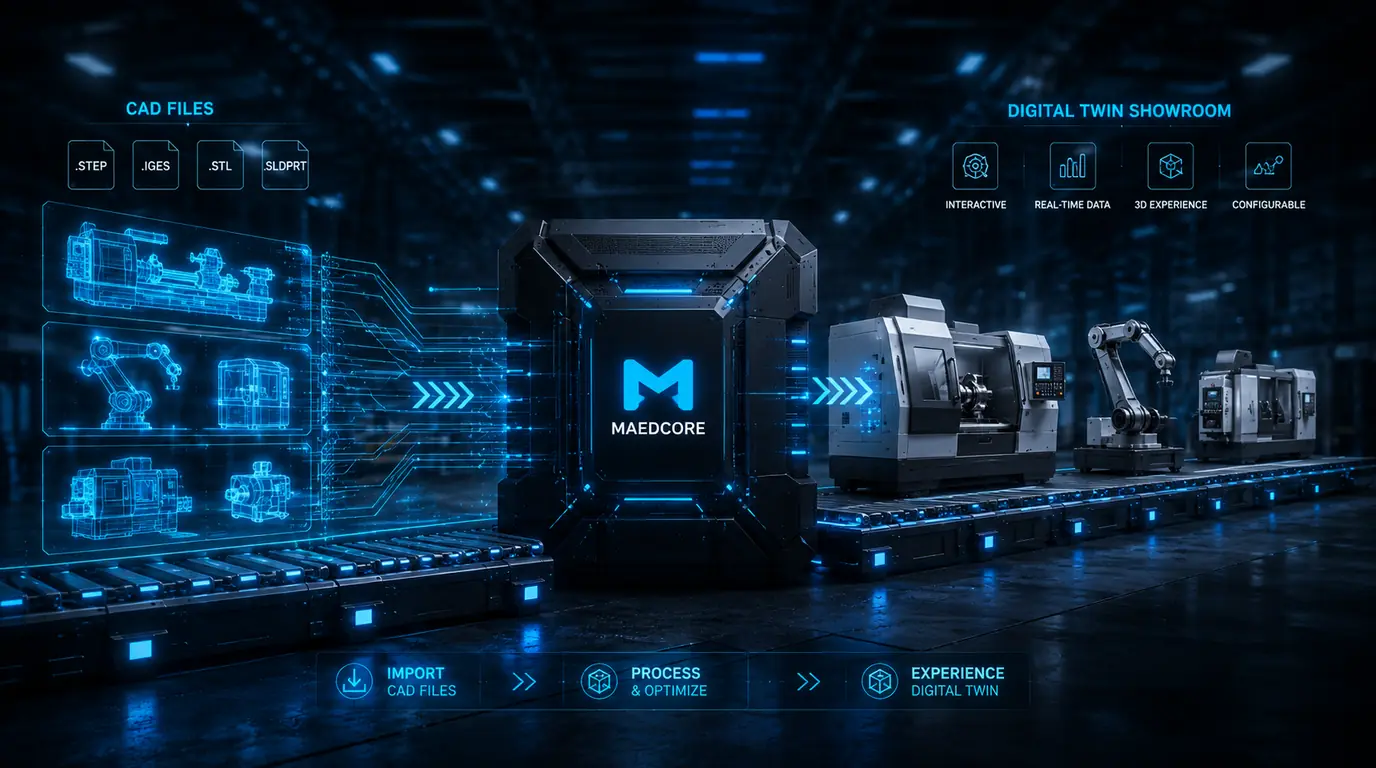
Converting a CAD file into a digital twin virtual showroom is a structured sequence of five technical decisions — not a simple export. The business case is concrete: a single trade show appearance costs $25,000–$45,000, while a VR showroom amortises across every show, every sales visit, and every remote demo. There is, however, a conceptual trap that destroys credibility with technical buyers: a CAD-derived showroom is a product digital twin prototype, not an operational twin — and conflating the two is the most common mistake in vendor marketing.
Why your CAD catalogue is the natural starting point — and where it runs out
A CAD file captures the geometry and design intent of a product — it is the geometric foundation of a digital twin — but on its own it is static and disconnected from operational reality.
According to Siemens, digital twin modelling can form part of both CAD software and simulation software: CAD creates the virtual representation or geometry of the physical asset — modelling geometry, structure, components, and assemblies. The critical nuance comes from ARC Advisory Group (2026): “CAD models provide structured descriptions of assets, capturing geometry and design intent, but remain static and disconnected from operational reality. Digital twins, by contrast, are dynamic systems, continuously updated with real-time data.”
This defines a four-level spectrum worth mapping clearly before speaking to any vendor:
- Static 3D render — high-quality image or video generated from CAD.
- Interactive VR model — optimised CAD geometry, navigable in real time in a VR or WebGL viewer.
- Product digital twin prototype — interactive model with configuration logic, PMI technical annotations, and possibly historical performance data.
- Operational twin — model connected to real-time IoT sensors (OPC-UA, MQTT, REST API), with simulation and prediction capability.
The product twin segment — the closest to the showroom use case — accounted for 35.72% of the global digital twin market share in 2026. The global market was valued at $21.14 billion in 2025 according to MarketsandMarkets, though Grand View Research puts the same year at $35.8 billion — a divergence that reflects differences in scope: some studies count software only, others include hardware, services, and adjacent IoT infrastructure. For an engineering lead evaluating a specific investment, the relevant figure is not market size but which level of the spectrum you want to operate at — and that is what the Five Gates determine.
The technical pipeline: from STEP to real-time VR scene
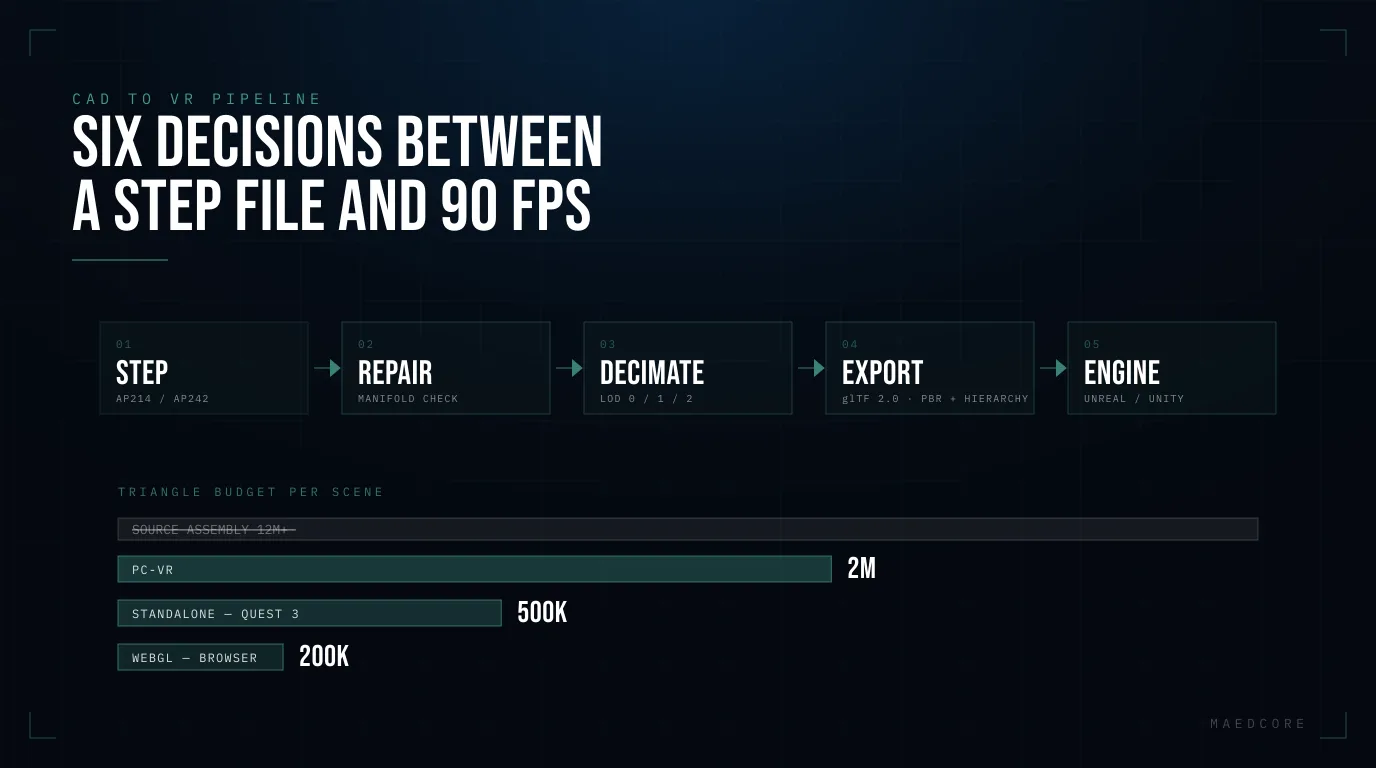
Converting a several-hundred-megabyte CAD assembly into a smooth 72–90 fps experience on a standalone headset is not an export operation — it is six technical decisions in sequence, each with consequences for fidelity, performance, and cost.
The invisible geometry problem
Industrial CAD assemblies contain internal components, functional bores, and protrusions that are irrelevant to visualisation. Automated removal of this geometry can reduce file size by up to 90% without degrading visual perception — a real-world example: a 500 MB automotive assembly reduced to 50 MB. Keeping all internal geometry is the single most costly performance mistake in the pipeline.
The polygon budget by platform
Standalone headsets (Meta Quest 3, Pico) impose a strict polygon budget to maintain 72–90 fps. Intelligent decimation with sharp-edge preservation and multi-level LOD generation (LOD 0, 1, 2) ensures frame stability on heavy industrial assemblies. In our experience, the practical thresholds are:
- Standalone (Quest 3): < 500,000 triangles per scene
- PC-VR (tethered): < 2,000,000 triangles
- WebGL (browser): < 200,000 triangles
Unreal Engine vs. Unity and the glTF 2.0 standard
The glTF 2.0 format combines transmission efficiency, PBR material support, and hierarchy preservation, making it the preferred target format for VR environments. On the engine side, Unreal Engine’s Datasmith plugin enables direct import from STEP AP203/214/242, CATIA V5, NX, SolidWorks, Creo, JT, and IFC. The most common risk: CAD works in millimetres and Unreal Engine defaults to centimetres — a 1:1 scale error turns a machine tool into a building. Unity, by contrast, reads no B-Rep format natively: integrating CAD data requires prior conversion to mesh format via a third-party tool.
PMI annotations (Product Manufacturing Information) — tolerances, surface specifications, assembly notes — must remain accessible in VR to preserve the model’s technical value. This preservation is one of the most specific challenges in CAD-to-VR conversion: the technical buyer attending a demo will ask about specifications, and if the model cannot answer them, the showroom’s credibility erodes immediately.
Tool stack by pipeline stage
| Stage | Main options | Key notes |
|---|---|---|
| CAD source | SolidWorks, CATIA V5/V6, NX, Creo, Inventor | STEP AP214/242 as neutral export |
| Repair & simplification | CADfix VIZ (ITI), Spatial 3D InterOp, Datakit CrossManager | Removing internal geometry can cut file size by up to 90% |
| Format conversion | Datasmith (Unreal), CADfix VIZ → FBX/glTF, TheoremXR | TheoremXR handles STEP, JT, 3D XML, FBX, and glTF in a single automated pipeline |
| Real-time engine | Unreal Engine 5 (photorealism, Nanite), Unity (mobile/AR), NVIDIA Omniverse (collaborative twin) | Unreal leads in photorealistic rendering; Unity dominates AR and mobile |
| VR delivery | Meta Quest 3 (standalone), HTC Vive Pro (PC-tethered), Apple Vision Pro, WebXR | WebXR and glTF enable browser-based CAD-VR experiences with no installation |
| PMI/metadata viewer | 3DViewStation (Kisters), Theorem-XR | For preserving engineering annotations in the VR environment |
The Five Gates: a framework for assessing whether your catalogue is ready
Before speaking to any vendor, an engineering or operations lead can run a structured five-question evaluation — the “Five Gates” — that determines the conversion route, the achievable experience level, and the cost range, in a single pass. This framework is the direct synthesis of the documented technical challenges and the CAD-vs-twin distinction established by ARC Advisory.
The Five Gates: evaluation table
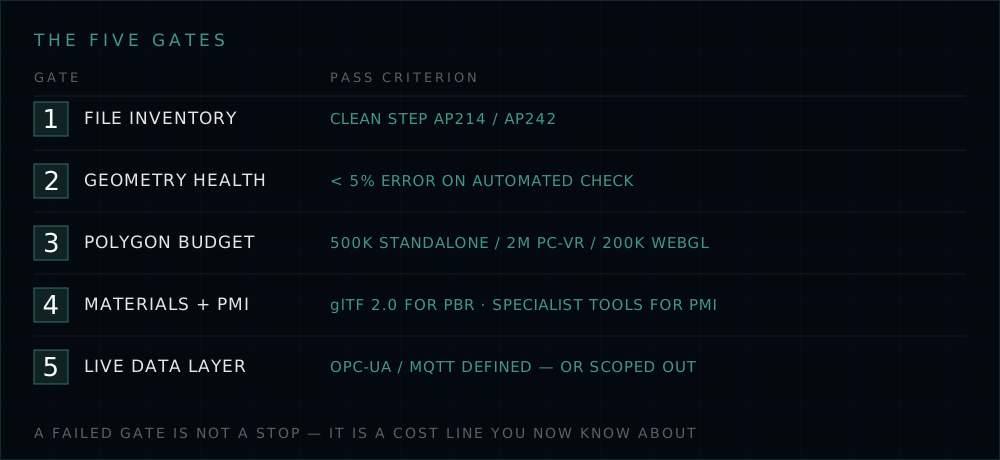
| Gate | Key question | Pass criterion | Fail → Required action |
|---|---|---|---|
| Gate 1: File inventory | What CAD formats exist in the catalogue? Single system or mixed? | Single format or clean STEP AP214/242 exports available | Audit and normalise to STEP AP214/242 before any conversion |
| Gate 2: Geometry health | Are the assemblies manifold? Any non-manifold edges, missing faces, or internal geometry? | < 5% error rate on automated check (e.g. CADfix, Spatial) | Mandatory repair pass before conversion |
| Gate 3: Polygon budget vs. target platform | What is the delivery platform? (Standalone / PC-VR / WebGL / CAVE) | Standalone (Quest 3): < 500K triangles/scene; PC-VR: < 2M; WebGL: < 200K | Decimation + LOD generation required; budget 1–3 days per complex assembly |
| Gate 4: Material fidelity and PMI | Does the showroom need PBR materials and/or PMI annotations (tolerances, specifications)? | PBR: use glTF 2.0 pipeline; PMI: requires specialist tools (3DViewStation, CADfix VIZ) | Define which metadata is “must-have” vs. “nice-to-have” for the technical sales use case |
| Gate 5: Live data layer | Does the showroom need to behave as a real digital twin (live sensor data) or as a high-fidelity interactive model? | Interactive model: no IoT integration required; Real twin: define data sources (OPC-UA, MQTT, REST API) | Scope IoT integration separately; do not conflate it with the showroom MVP |
Explicit framework assumptions
- Gate 2 assumes access to at least one automated geometry-checking tool. Without it, tessellation errors are only discovered inside the VR engine, multiplying the cost of correction.
- Gate 3 assumes the VR scene will contain a maximum of 3–5 products simultaneously. Catalogues with more than 10 SKUs in scene at once require a more granular LOD analysis.
- Gate 5 is the most strategic decision: most showroom projects that fail do so because the sales team sold a “digital twin” with no data layer, and the technical buyer spotted it during the demo.
Cost ranges by experience level
These ranges are indicative estimates based on knowledge of the pipeline described in the sources, not published figures. They are presented as engineering judgement.
| Scope | Estimated range | Indicative timeline |
|---|---|---|
| Single product, standalone VR demo (Quest 3, clean STEP available) | $3,500–$9,000 | 2–4 weeks |
| 5–10 product catalogue, interactive VR showroom (PC-VR, PBR materials) | $16,000–$44,000 | 6–12 weeks |
| Full catalogue (50+ SKUs), WebGL showroom with configurator | $44,000–$130,000 | 3–6 months |
| Product digital twin prototype (interactive model + IoT layer) | $65,000–$220,000+ | 4–9 months |
For industrial manufacturers based in the Madrid corridor, between 20% and 25% of eligible software and hardware costs can be offset through the Comunidad de Madrid’s Industry 4.0 and digitalisation grants, co-financed by the ERDF 2021–2027 Fund. Companies in the Henares Corridor and Southern Metropolitan zones qualify for the maximum 25% rate. One practical caveat: the Kit Digital programme does not cover custom development — only configurable SaaS solutions.
The business case: physical trade show vs. permanent showroom
A VR showroom does not compete with physical trade shows — it complements them, covering the self-directed research phase that already accounts for 33% of B2B buyer time.
The cost of a physical trade show appearance is concrete: shipping materials $2,000–$5,000, 20×20 ft exhibition space $15,000–$20,000, stand design $5,000–$15,000, staff $2,500–$5,000, according to Trade Show Labs (2026). Total: easily $25,000–$45,000 per event. A manufacturer attending three shows a year spends $75,000–$135,000 on physical presence alone.
The amortisation argument is straightforward: a VR showroom built once deploys at every show, every sales visit, and every remote demo. B2B buyers spend approximately 33% of their time on self-service content throughout the buying process, and the average B2B sales cycle runs 6.5 months with an average of 25 stakeholders involved in the decision.
The tension the data reveals is real: 95% of exhibitors still prefer in-person events, yet more than 65% of companies favour digital interactions for the buying process itself. The resolution: trade shows generate awareness; virtual showrooms serve the self-directed research phase. On buyer confidence, AR/VR product experiences reduce return rates by 22–40%, and 80% of users report greater purchase confidence — figures drawn primarily from e-commerce rather than industrial B2B, but the direction of the effect is consistent with what we observe in technical visualisation projects.
Common mistakes that inflate cost and erode credibility
1. “Export and hope”: The technical vocabulary between CAD and polygonal mesh is incompatible. Metadata, part connections, and names are lost in translation. Fix: always run a geometry audit before conversion.
2. Internal geometry left in: Keeping all internal components is the most frequent error. Removing non-visible geometry can reduce file size by 50–80% in complex assemblies, according to CAD Interop (2025).
3. Material proliferation: 47 materials where 5 would do destroys frame rate. Consolidating materials before export is one of the highest-return optimisations in the pipeline.
4. Scale error: CAD works in millimetres; Unreal Engine defaults to centimetres. Always validate scale in the target engine before adding any interactions.
5. Selling a “digital twin” with no data layer: This is the most serious credibility error. End users clearly articulate that digital twin solutions must go beyond visualisation toward operational value. Presenting an interactive VR model as a “full digital twin” to a technical buyer is a reputational risk that Gate 5 of the framework explicitly prevents.
The Madrid industrial context
30.1% of Madrid-based companies with more than 10 employees have already adopted AI solutions, nine points above the Spanish national average of 21.1%. The city of Madrid, covering just 0.1% of national territory, generates 12.1% of Spain’s GDP and concentrates the sectors — automotive, aerospace, defence, pharmaceutical machinery — where the CAD-VR showroom has the most immediate applicability. The closest local reference point in manufacturing digital twins is the one developed by IMDEA Materials and the Universidad Politécnica de Madrid for real-time analysis of composite material manufacturing — a plant-level operational twin rather than a product twin, but one that demonstrates the maturity of the local ecosystem.
One example of how high-fidelity industrial 3D visualisation can accelerate complex technical sales cycles: in a 3D industrial animation project for the sale of complete rolling mill factories, photorealistic representation of the production process allowed international buyers to evaluate the solution without travelling — exactly the kind of use case that an interactive VR showroom scales and makes permanent. Further detail in the industrial 3D animation case study.
Related reading
- OmniViewer in Action: Inside Maedcore’s VR Showroom for Industrial Machinery
- Digital Twin Showrooms for Industrial Machinery Manufacturers
- Virtual Showroom vs. Industrial Trade Show Booth: A Real Cost and ROI Comparison
Sources
- Digital Twin Market Size, Share, Latest Trends & Growth Analysis, 2025–2030 — MarketsandMarkets, 2025
- Digital Twin Market Size And Share | Industry Report, 2033 — Grand View Research, 2026
- Digital Twin Market Share & Growth Report 2026–2034 — Fortune Business Insights, 2026
- Digital Twins in Manufacturing: Implementation Guide 2026 — MaintenanceOnline, 2025
- From CAD Models to Open, Interoperable Digital Twins — ARC Advisory Group, 2026
- Digital Twin — Siemens Digital Industries — Siemens, 2025
- How to Use mesh formats for 3D visualisation and AR — CAD Interop, 2025
- CAD Simplification for VR and Augmented Reality — CAD Interop, 2025
- 3D interoperability around Virtual Reality software Unreal — CAD Interop, 2025
- 3D Interoperability Around Unity: Import, Export, VR — CAD Interop, 2025
- How to speed up your pipeline for CAD to VR — Meshmatic, 2022
- 150+ Trade Show Statistics for 2026 — Trade Show Labs, 2026
- Global B2B Sales Statistics & Buying Behavior — Cirrus Insight, 2026
- The State of B2B Sales in 2025: A Data-Driven Report — Kondo, 2026
- Augmented Reality in Ecommerce: Benefits, Costs, Examples and ROI in 2026 — FrameSixty, 2026
- La Comunidad de Madrid mantiene su liderazgo en digitalización empresarial — Comunidad de Madrid, December 2025
- Ayudas a la digitalización e Industria 4.0 de pymes industriales de la Comunidad de Madrid — Madrid Cluster de Automoción / Comunidad de Madrid, 2025
- Informe Industria Ciudad de Madrid — CEIM, 2024
- La Comunidad de Madrid desarrolla un gemelo digital para analizar en tiempo real la fabricación de materiales compuestos — Advanced Manufacturing Madrid / IMDEA Materiales, 2024
- Industrial 3D Animation: Selling Twin Factories with Maedcore — Maedcore, 2025
- B2B Buying Statistics — PassiveSecrets, 2025
About the Author
Robotics Engineer
For over a decade, I have been driven by a single mission: leveraging AI and robotics to build a world of automated production. I believe that by creating self-sufficient systems, we can empower people to refocus on what truly matters—their families and their passions. My expertise spans from winning prestigious European startup competitions to architecting complex, integrated hardware and software projects. I specialize in bridging the gap between today's industrial challenges and tomorrow's autonomous solutions.
Frequently Asked Questions
What is the difference between a CAD model and a digital twin?
What CAD format is the best starting point for conversion to VR?
How much does it cost and how long does it take to build a virtual showroom from a CAD catalogue?
Can engineering tolerances and technical specifications (PMI) be preserved in a VR showroom?
Is a dedicated VR headset required, or can it run in a browser?
Can industrial SMEs in Spain access public funding for these projects?
Ready to transform your company?
Book a free 30-minute meeting with an engineer.